Sunday, September 17, 2017

Multiple linear regression in Python

Sometimes we need to do a linear regression, and we know most used spreadsheet software does not do it well nor easily.

In the other hand, a multiple regression in Python, using the scikit-learn library - sklearn - it is rather simple.


import matplotlib.pyplot as plt
import pandas as pd
from sklearn.linear_model import LinearRegression

# Importing the dataset
dataset = pd.read_csv('data.csv')
# separate last column of dataset as dependent variable - y
X = dataset.iloc[:, :-1].values
y = dataset.iloc[:, -1].values

# build the regressor and print summary results
regressor = LinearRegression()
regressor.fit(X,y)
print('Coefficients:\t','\t'.join([str(c) for c in regressor.coef_]))
print('R2 =\t',regressor.score(X,y, sample_weight=None))

#plot the results if you like
y_pred = regressor.predict(X)
plt.scatter(y_pred,y)
plt.plot([min(y_pred),max(y_pred)],[min(y_pred),max(y_pred)])
plt.legend()
plt.show()

Thursday, August 31, 2017

Calculate the centroid of a polygon with python


In this post I will show a way to calculate the centroid of a non-self-intersecting closed polygon.

I used the following formulas,

C_{\mathrm {x} }={\frac {1}{6A}}\sum _{i=0}^{n-1}(x_{i}+x_{i+1})(x_{i}\ y_{i+1}-x_{i+1}\ y_{i})

C_{\mathrm {y} }={\frac {1}{6A}}\sum _{i=0}^{n-1}(y_{i}+y_{i+1})(x_{i}\ y_{i+1}-x_{i+1}\ y_{i})

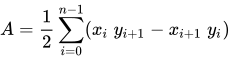
A={\frac {1}{2}}\sum _{i=0}^{n-1}(x_{i}\ y_{i+1}-x_{i+1}\ y_{i})\;

as shown in https://en.wikipedia.org/wiki/Centroid#Centroid_of_a_polygon .

In the following code, the function receives the coordinates as a list of lists or as a list of tuples.

from math import sqrt

def centroid(lstP):
    sumCx = 0
    sumCy = 0
    sumAc= 0
    for i in range(len(lstP)-1):
        cX = (lstP[i][0]+lstP[i+1][0])*(lstP[i][0]*lstP[i+1][1]-lstP[i+1][0]*lstP[i][1])
        cY = (lstP[i][1]+lstP[i+1][1])*(lstP[i][0]*lstP[i+1][1]-lstP[i+1][0]*lstP[i][1])
        pA = (lstP[i][0]*lstP[i+1][1])-(lstP[i+1][0]*lstP[i][1])
        sumCx+=cX
        sumCy+=cY
        sumAc+=pA
        print cX,cY,pA
    ar = sumAc/2.0
    print ar
    centr = ((1.0/(6.0*ar))*sumCx,(1.0/(6.0*ar))*sumCy)
    return centr

Sunday, July 30, 2017

A Library to connect Excel with Python - PYTHON FOR EXCEL

PYTHON FOR EXCEL. FREE & OPEN SOURCE.

xlwings - Make Excel Fly!

xlwings is a BSD-licensed Python library that makes it easy to call Python from Excel and vice versa:
Scripting: Automate/interact with Excel from Python using a syntax close to VBA.

- Macros: Replace VBA macros with clean and powerful Python code.
- UDFs: Write User Defined Functions (UDFs) in Python (Windows only).

Numpy arrays and Pandas Series/DataFrames are fully supported. xlwings-powered workbooks are easy to distribute and work on Windows and Mac.

Install with: pip install xlwings;

It is already included in Winpython and in Anaconda.

Links


Thursday, July 27, 2017

Alternating Block Hyetograph Method with Python

To generate hypothetic storm events, we can use some methods as Alternating block method, Chicago method, Balanced method, SCS Storms among others.

In this post I show a way to generate a hypothetic storm event using the Alternating block method.

This python code uses the numpy library. The altblocks functions uses as input the idf parameters as list, and total duration, delta time and return period as floats.


import numpy as np

def altblocks(idf,dur,dt,RP):
    aDur = np.arange(dt,dur+dt,dt)    # in minutes
    aInt = (idf[0]*RP**idf[1])/((aDur+idf[2])**idf[3])  # idf equation - in mm/h
    aDeltaPmm = np.diff(np.append(0,np.multiply(aInt,aDur/60.0)))
    aOrd=np.append(np.arange(1,len(aDur)+1,2)[::-1],np.arange(2,len(aDur)+1,2))
    prec = np.asarray([aDeltaPmm[x-1] for x in aOrd])
    aAltBl = np.vstack((aDur,prec))
    return aAltBl

Tuesday, July 25, 2017

Make numpy array of 'datetime' between two dates

A simple way to create an array of dates (time series), between two dates:

We can use the numpy arange - https://docs.scipy.org/doc/numpy/reference/generated/numpy.arange.html , function which is most used to create arrays using start / stop / step arguments.

Syntax:
numpy.arange([start, ]stop, [step, ]dtype=None)

In case of datetime values, we need to specify the step value, and the correct type and unit of the timestep in the dtype argument

. dtype='datetime64[m]' will set the timestep unit to minutes;
. dtype='datetime64[h]' will set the timestep unit to hours;
. dtype='datetime64[D]' will set the timestep unit to days;
. dtype='datetime64[M]' will set the timestep unit to months;
. dtype='datetime64[Y]' will set the timestep unit to months;

For example:

import numpy as np
dates = np.arange('2017-06-01', '2017-06-02', 15, dtype='datetime64[m]') # 15 is the timestep value, dtype='datetime64[m] means that the step is datetime minutes


This example will create an array of 96 values, between 01jun2017 and 02jun2017, with a time step of 15 minutes.

Wednesday, July 19, 2017

Solving Manning's equation for channels with Python


Manning's equation is a very common formula used in hydraulic engineering. It is an empirical formula that estimates the average velocity of open channel flow, based on a roughness coefficient.
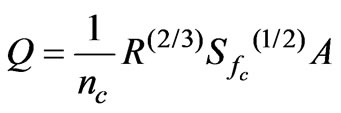
Image result for manning equation

The problem of solving Manning's formula is that it is an implicit formula - the water depth variable (independent variable) is inside R (Hydraulic Radius) and A (flow area) - becoming dificult to isolate the independent variable.

A common approach for solving this equation is to use numerical methods, as the Newton-Raphson method.

In this case, we try different water depths until the function 
 - a manipulation of the original manning formula, became equal to zero.

An implementation for the resolution of the above, for open channels and using the Newton-Raphson approximation, is shown below.

If you found this code of this explanation useful, please let me know. 


def manningC(lam, args):
    Q,base,alt,talE,talD,nMann,decl = args
    area = ((((lam*talE)+(lam*talD)+base)+base)/2)*lam
    perM = base+(lam*(talE*talE+1)**0.5)+(lam*(talD*talD+1)**0.5)
    raio = area/ perM
    mannR = (Q*nMann/decl**0.5)-(area*raio**(2.0/3.0))
    return mannR

def solve(f, x0, h, args):
    lastX = x0
    nextX = lastX + 10* h  # "different than lastX so loop starts OK
    while (abs(lastX - nextX) > h):  # this is how you terminate the loop - note use of abs()
        newY = f(nextX,args)  # just for debug... see what happens
        # print out progress... again just debug
        print lastX," -> f(", nextX, ") = ", newY     
        lastX = nextX
        nextX = lastX - newY / derivative(f, lastX, h, args)  # update estimate using N-R
    return nextX

def derivative(f, x, h, args):
    return (f(x+h,args) - f(x-h,args)) / (2.0*h)

if __name__=='__main__':
    # arguments in this case are - flow, bottom width, height,
    # Left side slope, rigth side slope, manning, longitudinal slope
    args0 = [2.5,1,.5,1.0,1.0,.015,.005]
    initD = .01
    # call the solver with a precision of 0.001
    xFound = solve(manningC, initD, 0.001, args0)
    print 'Solution Found - Water depth = %.3f' %xFound


Friday, June 30, 2017

Simple code to generate synthetic time series data in Python / Pandas

Here is a simple code to generate synthetic time series.

import numpy as np
import pandas as pd

med = 15.5
dp = 8.2
sDays = np.arange('2001-01', '2016-12', dtype='datetime64[D]')
nDays = len(sDays)

s1 = np.random.gumbel(loc=med,scale=dp,size=nDays)
s1[s1 < 0] = 0

dfSint = pd.DataFrame({'Q':s1},index=sDays)
dfSint.plot()

Saturday, June 24, 2017

Pandas - How to read text files delimited with fixed widths

With Python Pandas library it is possible to easily read fixed width text files, for example:


In this case, the text file has its first 4 lines without data and the 5th line with the header. The header and the data are delimeted with fixed char widths, being the widths sizes as following:
  •  12 spaces , 10 spaces ,6 spaces ,9 spaces ,7 spaces,7 spaces ,7 spaces ,4 spaces
The following code will read the file as a pandas DataFrame, and also parse the dates in the datetime format:

import pandas as pd

ds2 = pd.read_fwf('yourtextfile.txt', widths=[12,10,6,9,7,7,7,4], skiprows=4, parse_dates=True)


Wednesday, June 21, 2017

Exponential curve fit in numpy

With numpy function "polyfit" we can easily fit diferent kind of curves, not only polynomial curves.

According to the users manual, the numpy.polyfit does:


"
Least squares polynomial fit.

Fit a polynomial p(x) = p[0] * x**deg + ... + p[deg] of degree deg to points (x, y). Returns a vector of coefficients p that minimises the squared error.
"


If we use X and y as arrays with our data, the code:

coef = np.polyfit(X, np.log(y), 1)


will return two coefficients, who will compose the equation:

exp(coef[1])*exp(coef[0]*X)

Giving you the exponential curve that better fits our data - X and y.
The polyfit function can receive weight values, which we can use in case of giving less importance to very small values, for example. We can use a weight function as following:

coef = np.polyfit(X, np.log(y), 1, w=np.sqrt(y))


Giving more weight to higher values.

To retrieve the R-squared index of our exponenctial curve, we can use de scikit r2_score, as following:
y_pred = np.exp(coefs[1])*np.exp(coefs[0]*X)

from sklearn.metrics import r2_score

r2s = r2_score(y, y_pred, sample_weight=None, multioutput=None)

Wednesday, June 7, 2017

Python and Pandas - How to plot Multiple Curves with 5 Lines of Code

In this post I will show how to use pandas to do a minimalist but pretty line chart, with as many curves we want.

In this case I will use a I-D-F precipitation table, with lines corresponding to Return Periods (years) and columns corresponding to durations, in minutes. as shown below:


For the code to work properly, the table must have headers in the columns and lines, and the first cell have to be blank. Select the table you want in your SpreadSheet Editor, and copy it to clipboard.

Then, run the following code:


import pandas as pd

table = pd.read_clipboard()
tabTr = table.transpose().convert_objects(convert_numeric=True)
eixox = tabTr.index.values.astype(float)
tabTr.set_index(eixox).plot(grid=True)

And Voila!: